
How to Search Cases by Name
Superior Court searches begin at the Odyssey Portal. Pick Smart Search and type the name in "Last, First Middle" order. Capitalization does not matter. A wildcard can stand in for part of a name so long as the last name has at least three characters and the first has one. A hyphenated name may need a second try with the punctuation stripped out.
- Choose Smart Search and enter the party name in the stated order.
- Complete “I’m not a Robot,” then open Advanced Filtering Options.
- Select San Juan County and narrow by type, status, filing dates, or judicial officer.
- Compare party names, case types, and filing data in the results.
- Open the matching number and read Case Information, Party, Events, Hearings, Disposition Events, and Register of Actions.
| Field Label | Type | Required | Notes |
|---|---|---|---|
| Smart Search text | Text | Yes | Case number or “Last, First Middle”; wildcard at end. |
| Robot check | Checkbox | Yes | Public CAPTCHA verification. |
| Court Location | Dropdown | No | Select San Juan County. |
| Case Type and Status | Dropdowns | No | Values depend on public case type. |
| File Date Start/End | Date | No | Narrows common-name results. |
Start with San Juan Odyssey
Washington's Case Records Search now routes San Juan Superior Court lookups to Odyssey. The portal serves the Superior Court of Washington, San Juan County. It offers Smart Search, Search Hearings, Judgment Search, and case-detail tabs. Felonies, family law, probate, guardianship, juvenile and dependency cases, title matters, and larger civil disputes all start here, within public-access limits. The County Clerk keeps the underlying Superior Court file. An entry in the Register of Actions is not always the filed document itself. Only some public documents carry links. When a link is missing, the County Clerk record route asks for a written request listing the case number, case name, and the specific files wanted.
How to Search by Case Number
A full case number is the best search key. Washington's Superior format usually looks like 99-9-99999-9. That string holds the year, a case-type digit, a sequence number, and a final check or county digit. Odyssey counties sometimes add a county code at the end. One San Juan calendar example is 26-2-05070-28. The number alone tells you nothing about parties or outcome. The type digits break down as 1 criminal, 2 civil, 3 domestic, 4 probate or guardianship, 7 juvenile dependency, 8 juvenile offender, and 9 judgment. A few types stay restricted online. Washington's case-number explanation cautions that older and lower-court formats differ.
San Juan Search Traps
Wildcards and Sounds Like do different jobs. The wildcard stretches an incomplete ending; Sounds Like hunts phonetic matches. Either one can drown you in results for a common name. Odyssey stops at the first 200 hits. Narrow things by adding San Juan County, a date range, case type, status, party role, attorney, or an exact number. Punctuation matters as well. Try hyphenated or spaced names both ways, with and without the marks. A partial Odyssey number search needs at least four characters. Citation-number search is off in Washington's public Odyssey setup. Infractions often point back to District Court.
No result is not proof of no case. Spelling, format, age, court level, restricted access, daily update lag, or an outage may explain the empty list.
What a Case Search Shows
The first job of a result is telling cases apart. Check the number, type, location, parties, and filing date before you open the details. The Register of Actions lists dated events, and the hearing and disposition tabs can explain a short event label.
| Case Number | The identifier with year, type, sequence, and final code where applicable. |
|---|---|
| Style or Parties | The caption and public party roles. |
| Case Type | The public classification, such as criminal, civil, domestic, probate, or judgment. |
| Filed Date and Status | The filing date and portal status, both subject to court verification. |
| Events and Hearings | Dated filings, orders, settings, courtroom data, and public outcomes. |
Trust the event titles rather than inventing shorthand of your own. San Juan County publishes no complete local code list. Labels like "Motion," "Order," "Judgment," "Hearing," and "Disposition" are helpful, but the document or the Clerk supplies the full context.
State Results Update Daily
The statewide index refreshes roughly every 24 hours, near 3 a.m. A status can be stale, and docket, judgment, and document links may be absent. That lag matters most after a new filing, a same-day hearing, a continuance, or a closure. When something conflicts, Odyssey or the court of record settles it. The state disclaimer is blunt. The search does not establish a criminal record. It does not guarantee identity, accuracy, completeness, or current status. Verify a match with the County Clerk or District Court. Do that before relying on it for your own case, historical research, or any public matter. A fresh electronic filing may also sit in clerk processing before it shows up. San Juan moved Superior filings to eFileWA in 2024. But eFileWA is a submission system, not the public docket. Anything filed outside clerk hours is processed the next court day. Check Odyssey for the public entry. Ask the Clerk directly when a time-sensitive filing has not appeared.
County vs Statewide Case Search
The two layers work together. Go statewide first when you do not know the court. Once San Juan Superior Court is identified, switch to Odyssey. District cases call for lower-court tools. That means re:SearchWA where offered, and direct access to the court.
| Feature | Washington Statewide Index | San Juan Court Route |
|---|---|---|
| Coverage | Municipal, district, superior, and appellate index data. | Odyssey for Superior; District channels for lower-court files. |
| Best use | Find the likely court or compare cases. | Read the local register, hearings, or requested file. |
| Depth | Reference fields with possible lag. | Local details and clerk-held official records. |
| Fallback | Official court directory. | Public computer, phone, counter, email, or written request. |
San Juan District Court Fallbacks
District Court handles misdemeanors, gross misdemeanors, infractions, and parking. Civil matters within its jurisdiction, small claims, protection orders, and name changes land there too. Friday Harbor municipal cases are routed there as well. Look up hearings through Find My Court Date using the court name, last name, and first initial. Or try the statewide Person and Case Search. re:SearchWA may broaden access. An unavailable portal never means the file is gone. You can also call District Court at (360) 378-4017 or stop at the counter. Another route is its records request. Superior Court users can reach the County Clerk at (360) 378-2163. Both courts sit on the second floor at 350 Court Street, Friday Harbor. The Clerk keeps a public computer available for free viewing during posted hours.
See San Juan Search Fields
The official Washington Superior search interface presents name, number, and business routes.
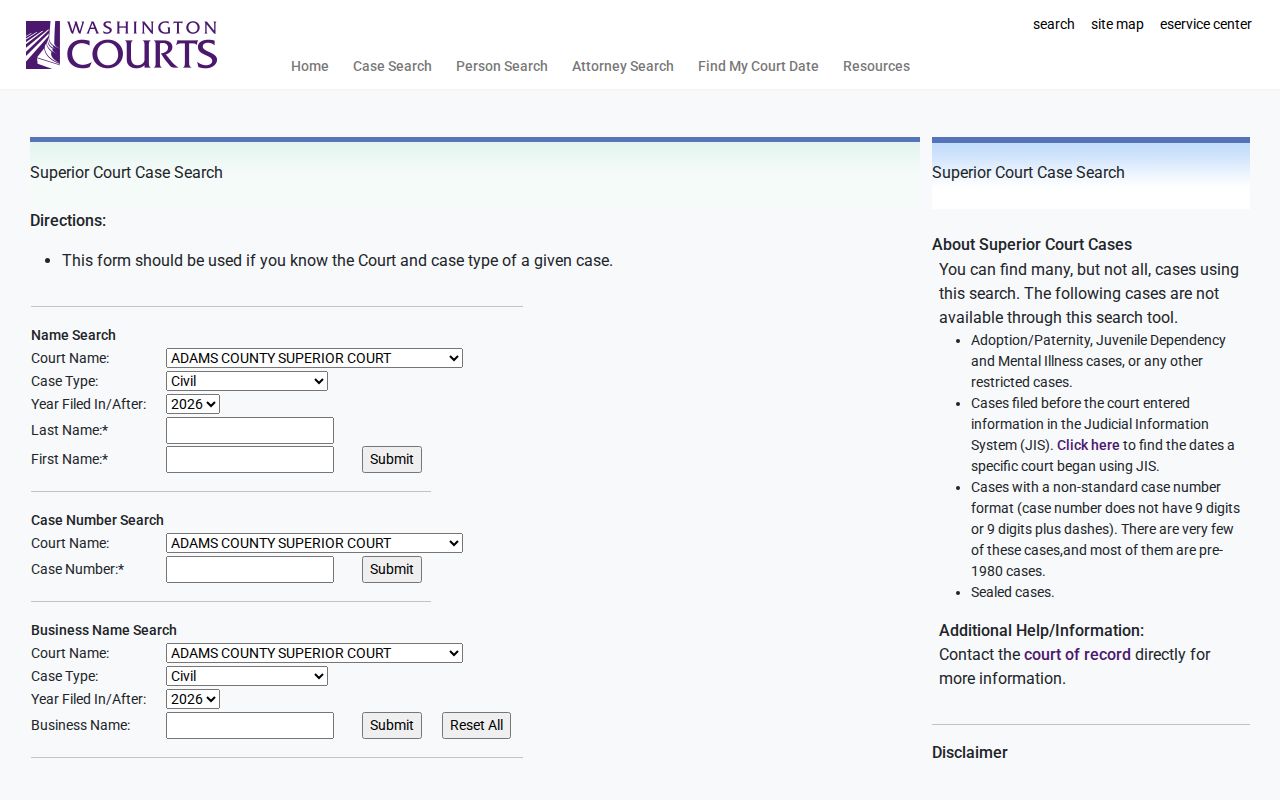
The search screen gives you several ways to narrow a San Juan County case lookup. Filters come before you drill into the record. Filter by court name, case type, and year. Spelling counts, too. Odyssey only matches what you type. Those filters cut the noise fast. They leave you closer to the case you actually want.
Not every lookup is a person lookup. Businesses get their own search path. That helps when a civil caption runs under a company name. If you know the lawyer on the case, an attorney search can zero in on the matter quickly. There is also a Search Hearings option. It covers party, business, attorney, judicial officer, and courtroom. Check each hit against the San Juan location. Confirm the case type before opening the docket entry.
Restricted Cases and Access Rules
Access to court records in Washington starts from a presumption of openness. Washington GR 31 allows that. But it also respects limits set by law, rule, or court order. So some things never show up in a public search. Juvenile offender records are one. So are sealed cases, adoptions, paternity matters, and dependency files. Mental-health cases and certain other restricted types belong on that list. Pre-JIS cases and older non-standard case numbers fall outside the searchable range as well.
Other files are only partly closed. Family law, protection-order, guardianship, and therapeutic court cases can show public case data. The sensitive parts stay hidden. Confidential forms, health records, financial source documents, and treatment reports remain restricted under GR 22. A docket entry, in short, is not the whole file.
When a case does not appear, there is usually a reason. It may be sealed, restricted, too old, misformatted, or simply not indexed yet. Under GR 15, a sealed file can leave nothing but a limited index notation. A sealed document can stay listed by title and date while its contents stay withheld. Ask the clerk about lawful access. Never try to get around a restriction.